Central phone number
Feel free to contact us!

+49 371 2371-216


Central fax number
Feel free to contact us!

+49 371 2371-299


Support hotline
We answer your questions

+49 371 2371-270

Send an eMail

SAP Business One
DATEV-Interface

The familiar workflow remains

Have you been working with DATEV for years? With SAP Business One, your trusted processes stay intact.

FASTER. DIGITAL. MORE EFFICIENT.

Logo Eschenbach Porzellan
Logo nutrimmun
Logo InceptForm
Logo Purize
Logo Lebenshilfe Bischofswerda
Logo pajas Metall
Logo Getriebebau Nossen
Logo Berndt und Marx
Logo Best Body
Logo Multifilm
Logo Canina
Logo Eastside

When SAP Business One and DAEV look like two worlds at first sight

You have been working with DATEV for years. You are familiar with every process and every click. But your company is growing, and management is relying on SAP Business One. Suddenly, questions arise:

  • Do I now have to give up my beloved DATEV?
  • Will my routine procedures still help me at all?
  • How should I transfer the data to my tax advisor in the future?
  • Does accounting in SAP Business One mean more work for me, rather than less?
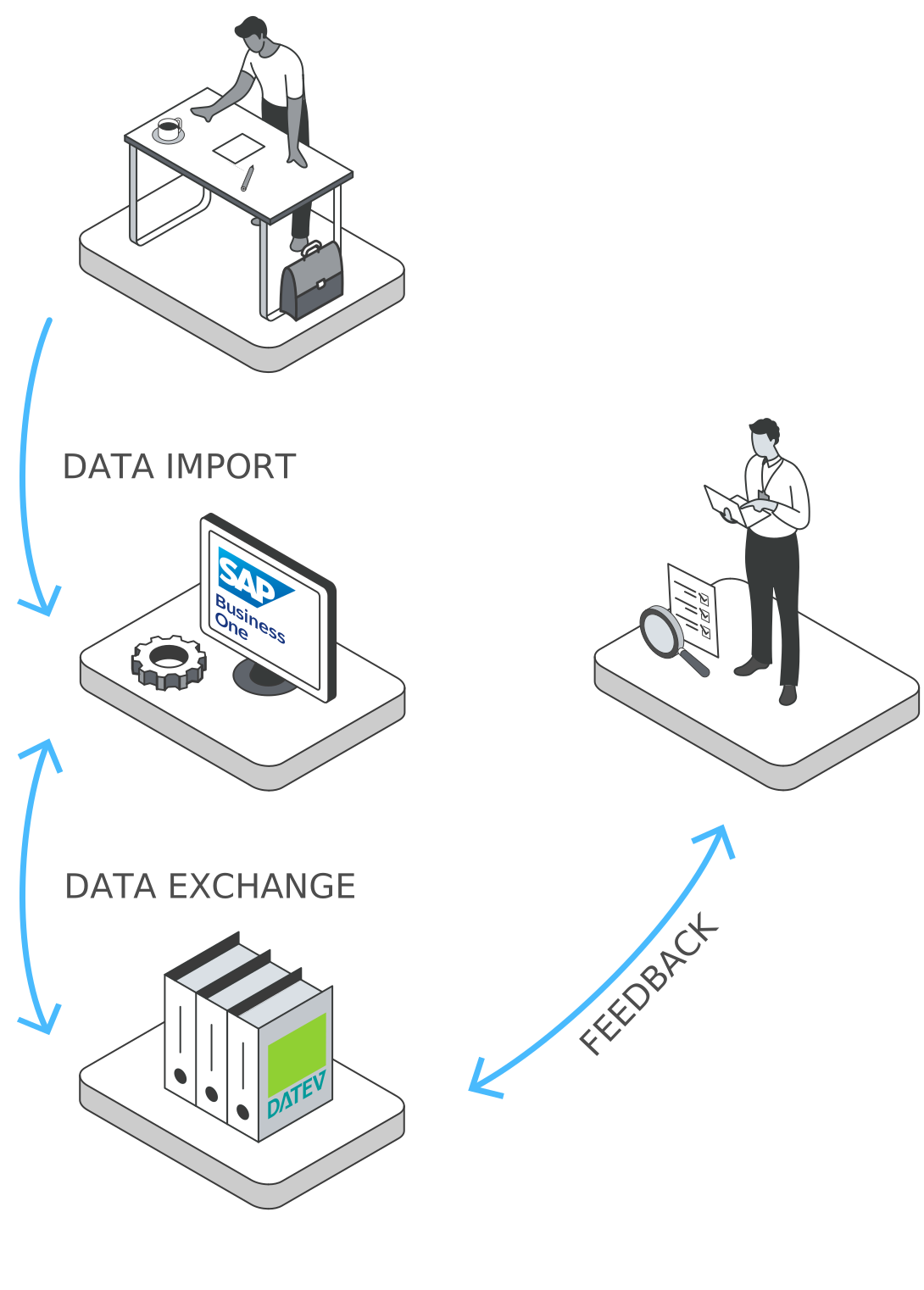
The concern is understandable, but unfounded. With the integrated DATEV FI interface, you can continue to use DATEV. You can continue working as usual, only more efficiently:

Automation
Realtime data
Digital storage

SAP Business One DATEV-FI-Interface

With the DATEV-FI-Interface  you can enter postings directly in SAP Business One, assign them to the appropriate accounts and automatically transfer your financial data to your tax advisor or directly to the DATEV system.

Enter bookings

Enter receipts, invoices and accounting journals centrally in the system.

Automatic conversion

The SAP Business One DATEV-FI-Interface automatically converts all accounting data into the correct DATEV format without errors.

Fast export

Export your financial data directly to the DATEV system or simply to your tax advisor.

Import of feedback

Easily import supplemented or corrected entries from your tax advisor back into SAP Business One.

Why you benefit from the DATEV-FI-Interface

Optimized collaboration

Accountants and tax advisors access the same, consistent data.

Error prevention

The automatic conversion of data into the correct formats prevents errors.

Time saving

The elimination of manual transfer and duplicate work when entering bookings frees up your time for the important things.

Transparency and control

Alle Vorgänge, vom einzelnen Konto bis zur gesamten Buchhaltung, werden im System dokumentiert und sind jederzeit nachvollziehbar.

Legal certainty

With financial accounting in SAP Business One you are on the safe side: financial data is archived in an audit-proof manner and can be checked at any time.

Always up to date

All data is available to you in real time. This means your tax advisor can always work with the latest figures.

What our customers say
Logo Lebenshilfe Bischofswerda

One of the things we appreciate about SAP Business One is the consistent workflow in the system, which avoids additional effort and provides a quick overview.

Stephan Preuß
Deputy Managing Director and Head of Administration

Logo Getriebebau Nossen

SAP Business One enables us to handle greater complexity with the same manpower. Another company was integrated into the group without the need for additional administrative staff.

Marcel Richter
Managing director

Logo Elbestahl

SAP Business One as a cloud solution saves us time and money. It also allows us to respond flexibly to changing requirements. SIGMA will continue to provide us with expert support in the future with its ERP expertise.

Mathias Gehmlich
Managing director

Logo Medizintechnik Werder

We made a conscious decision to switch from SAGE to SAP Business One and are looking forward to the new opportunities that the new ERP system with SIGMA's logistics solutions will offer us.

Ulrich Janns
Managing director

Since we started using SAP Business One, I have the necessary overview of my inventory. And above all, we are much faster when it comes to stocking the shop and eBay, etc. So it has been well worth it for us.

Thomas Müller
Owner

Your direct line to us

FAQ

The FAQ provides answers to the most frequently asked questions about accounting in SAP Business One. However, if you have any further questions, please feel free to contact us personally.

Yes, SAP Business One offers a DATEV-Interface as standard, which enables financial accounting data to be exported directly to the DATEV system.

Since the DATEV-FI-Interface is included in the standard version, there are no additional license costs.

No, the tax advisor does not need any special access for SAP Business One. They can process exported data using the DATEV standard formats.

The DATEV-FI-Interface enables GoBD-compliant export of accounting data, such as accounts or postings, from SAP Business One directly to DATEV.

Yes. Chart of accounts, cost centers and posting logic can be individually configured so that the interface is optimally integrated into your business processes.

Yes, SAP Business One has an integrated and certified financial accounting module as standard, which can be used to map the entire financial accounting process.

SIGMA Bot IconSIGMA bot
SAP Business One

Welcome to the SIGMA Chatbot!

Thank you for using our chatbot. Our chatbot is here to answer your questions and provide solutions. Here are some instructions for use:

1. Asking questions

Pose your question directly in the chat window. Our chatbot utilizes comprehensive data knowledge derived from one of our internal databases and text documents containing marketing information about products and services of the SIGMA Group, enabling the chatbot to provide you with detailed answers

2. Providing feedback

After the chatbot has responded, you have the option to rate the answer. This helps us understand how well the chatbot responds to different inquiries. Provide feedback on whether the answer was helpful or not.

3. Contacting the sales team

If the chatbot cannot provide a satisfactory answer, you have the option to send a request directly to our sales team from the chatbot window. We will assist you personally.

4. Email forwarding

If you wish to end the conversation with the chatbot or receive information via email, the chatbot offers the option to forward the conversation via email. Simply click "Send answer via email," enter your email address, and a few seconds later, the conversation with our SIGMA chatbot will be forwarded to your email address.

5. Chatbot optimization

We value your feedback! Ratings help us continuously improve and optimize the chatbot. Let us know what you like and where we can further improve. Feel free to send your feedback via email as well - marketing@sigma-chemnitz.de.

Thank you for using our chatbot. We hope it can effectively assist you with your concerns. If you have any further questions, we are here to help.

Privacy Information for Users of Our SIGMA Question Bot (Privacy Policy)

Use of Chatbot

(1) This website uses a chatbot developed exclusively by us. The chatbot is a software-based dialog system that enables text- or voice-based communication with a technical system.
The chatbot operates on the RAG (Retrieval-Augmented Generation) approach, retrieving data from a database to answer questions as accurately as possible. These data, along with the user’s question, are sent to the language models of OpenAI, Inc. without transmitting any personal information about the user. The models attempt to answer the question using the provided data and return the response. The data are sourced from one of our internal databases, comprising text documents with marketing information about products and services of the SIGMA Group.

(2) The following data are processed: session ID for user requests, the time of the request, the request itself, the chatbot’s response, the topic, and the language.

(3) We process this data to analyze the productivity of our chatbot and to continuously improve it. This includes the following purposes:

  • Chatbot performance optimization: We collect and analyze interactions with the chatbot to evaluate its efficiency and performance. This includes, for example, questions the chatbot could not answer, repeated inquiries on specific topics, and similar issues.
  • Enhancing the user experience: We use data to improve the user experience. This includes analyzing user feedback to make adjustments and expansions to the chatbot to better meet your needs.
  • Error detection and resolution: The data allow us to detect errors and issues in real time, enabling faster resolution and updates to the chatbot.
  • Statistical evaluations: We generate aggregated, anonymized statistical reports on chatbot usage. These reports contain no personal information and serve to analyze trends and patterns.

The legal basis is Article 6(1) Sentence 1 lit. f GDPR.

SIGMA Bot Icon

Hello, I'm the SIGMA Question Bot, and I'd be happy to answer your questions about SAP Business One.

Contact us
Topic
I am the
SIGMA Question Bot.
I can help you at lightning speed.