

Access data faster with Drag&Relate
![[Translate to English:] Bild Drag & Relate](/fileadmin/_processed_/7/c/csm_magazin_drag_relate_a15a9545db.jpeg "[Translate to English:] Drag & Relate")
 Jens DemutPublication
Update
It is a well-known fact that man is a creature of habit. He gets used to workflows that rarely change, even though there are often more efficient methods.
With our following tip we would like to help you to leave the well-worn track in order to work easier and faster with SAP Business One in the future. Once you have got the hang of it, you will agree with us that the small change of habit was worth it.
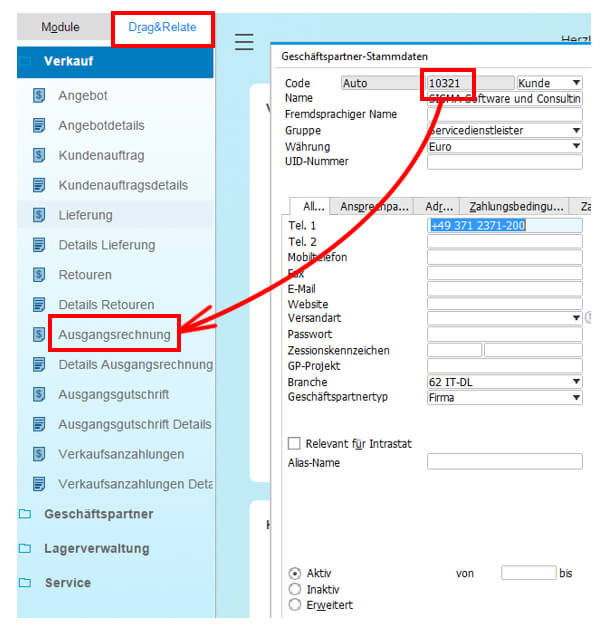
Activate the tab "Drag & Relate" in the main menu of SAP Business One. This will display all menus that support the Drag & Relate function. Now make a preselection in relation to the company area to be viewed ( e.g. Sales ). Now click on the customer number and keep the left mouse button pressed until a black border appears around the item number. Then, while keeping the mouse button pressed, drag the frame to the desired menu item. Now the data to be evaluated ( in this example it is the outgoing invoice ) is displayed.
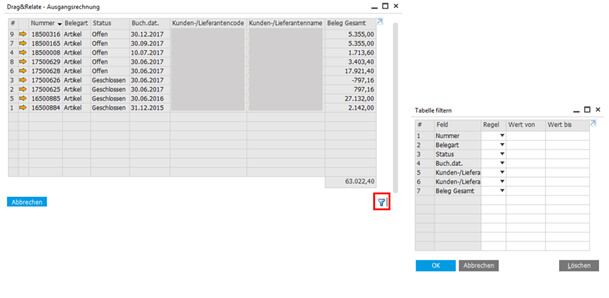
If there is only one corresponding document, open it directly. However, if there are several entries, click on the filter icon (blue funnel). A table appears in which you can filter your selection according to individual criteria.
Bottom line: Those who use the "Drag&Relate" function of SAP Business One benefit from a simplification in terms of usability as well as time savings.

Jens Demut
Managing Director SIGMA Software und Consulting GmbH
Jens Demut, graduate in business informatics (Dipl.Wirt.Inf.), has 19 years of professional experience in the SAP Business One area. He joined SIGMA Software & Consulting in 2007 as an SAP Business One Consultant and later took on the role of Managing Director.
We will be happy to present solutions for your industry and your processes.
Talk to the specialists for SMEs.


